SlideIO Viewer
SlideIO Viewer is a free, open-source desktop application for viewing whole-slide images. It opens a gigapixel slide in a window and lets you pan and zoom through it at interactive speed, without converting it or loading it into memory first.
The viewer is built on the SlideIO library, so it reads every format the library supports, and it runs on Windows, macOS and Linux.
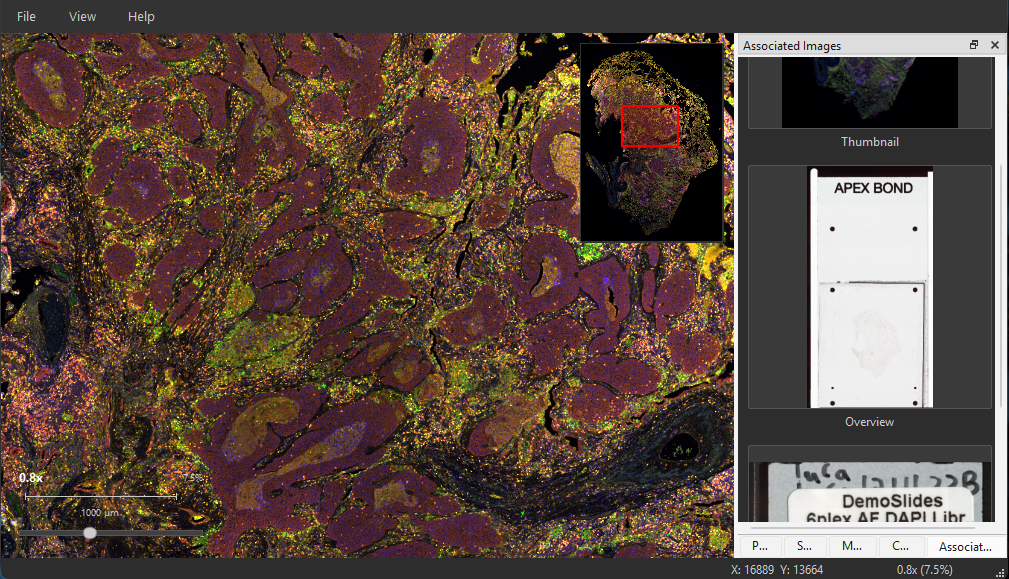
Features
- GPU-accelerated rendering. Tiles are uploaded to the GPU and drawn with OpenGL, so panning and zooming stay smooth on slides of any size.
- Pyramid navigation. The viewer reads from the zoom pyramid stored in the slide and loads tiles asynchronously, so the image stays responsive while the next level of detail arrives.
- Minimap. An overview of the whole slide with the current viewport marked, for orientation at high magnification.
- Associated images. The thumbnail, slide overview and label image shipped inside the file, shown in their own pane.
- Slide properties and metadata. Magnification, resolution, pixel format and the raw format-specific metadata of the slide.
- Channels. For fluorescent and multiplexed slides, per-channel visibility, colour and intensity, with a histogram.
- Multiple scenes. Slides holding more than one scanned region list their scenes as thumbnails; pick one to view it.
- Z-stacks and time series. Navigation through the Z and T dimensions of 3D and time-lapse data sets.
- Scale bar and position readout. A scale bar in micrometres, the current magnification, and the slide coordinates under the cursor.
- Drag and drop, recent files, dark theme.
Supported formats
The viewer reads every format the SlideIO library supports — Aperio SVS and AFI, Leica SCN, Zeiss CZI and ZVI, Hamamatsu NDPI, Olympus VSI, DICOM whole-slide images, PerkinElmer QPTIFF, OME-TIFF, Philips TIFF, and ordinary TIFF, PNG and JPEG images. See the table of drivers on the home page for the full list with file extensions.
Download
The viewer is distributed as a ready-to-run package for each platform. No Python, no compiler and no separate SlideIO installation are needed — everything the application depends on ships inside the package.
| Platform | Package |
|---|---|
| Windows 10/11 (x86-64) | Installer (.exe) or portable archive (.zip) |
| macOS (Apple Silicon) | Disk image (.dmg) |
| Debian 12+ / Ubuntu 22.04+ | Package (.deb) |
| Other Linux (x86-64) | Archive (.tar.gz) |
A machine with an OpenGL 3.3 capable GPU is required, which covers any graphics hardware of the last decade.
Keyboard shortcuts
Navigation
| Input | Action |
|---|---|
| Scroll wheel | Zoom toward the cursor |
| Left-click drag | Pan |
| Arrow keys | Pan |
Ctrl+0 |
Fit to window |
Ctrl+1 |
Actual pixels (1:1) |
Ctrl++ / Ctrl+- |
Zoom in / out |
F11 |
Full screen |
Files
| Shortcut | Action |
|---|---|
Ctrl+O |
Open a slide |
Ctrl+Shift+O |
Open a DICOM folder |
Ctrl+W |
Close the slide |
| Drag and drop | Open the dropped file |
Panes
| Shortcut | Pane |
|---|---|
Ctrl+M |
Minimap |
Ctrl+Shift+C |
Channels |
Ctrl+Shift+T |
Scenes |
Ctrl+Shift+A |
Associated images |
Ctrl+Shift+P |
Slide properties |
Ctrl+Shift+D |
Metadata |
Source code
The viewer is developed in the open at github.com/Booritas/slideio-view under the same BSD 3-clause license as the library. It is a C++17 Qt 6 application built with CMake and Conan; the repository’s README describes how to build it from source.